Two ways to partner

Channel Partner or Business Partner

Both tiers resell under their own terms — the more you commit to, the better your per-license rate and perks.

Channel Partner

Buy 10 licenses and sell them directly to your own customers, at whatever price you choose.

₹2,499/ license
10 licenses minimum · ₹24,990 total
  • Minimum order: 10 licenses (any mix of editions)
  • Sell directly to end customers, set your own price
  • 1 Employee Subsidy, Installation Bonus, Marketing support & Happy Customer Incentive
  • Best for individual resellers and local IT/POS dealers
Become a Channel Partner
Grow a network

Business Partner

Buy 50 licenses at a bulk rate, resell directly, and create your own Channel Partners under you.

₹1,999/ license
50 licenses minimum · ₹99,950 total
  • Minimum order: 50 licenses (any mix of editions)
  • Create and onboard your own Channel Partners
  • 3 Employee Subsidy & Marketing Expense coverage
  • Best for distributors and larger reseller networks
Become a Business Partner
Perks

What each tier includes

Beyond the license rate, both tiers come with extra support to help you sell.

Perk Channel Partner Business Partner
Employee subsidy 1 employee 3 employees
Installation bonus
Marketing support
Marketing expense coverage
Happy customer incentive
Compare

Which tier fits you?

Capability Channel Partner Business Partner
Minimum order 10 licenses 50 licenses
Price per license ₹2,499 ₹1,999
Total at minimum order ₹24,990 ₹99,950
Sell directly to end customers
Create & onboard Channel Partners
Mix of editions toward minimum order
Getting started

How partnering works

1

Contact us

Call or WhatsApp us and tell us which tier and how many licenses you're planning to order.

2

Confirm your order

We confirm your edition mix and quantity, then arrange payment directly with you.

3

Start reselling

Receive your license keys and start selling to customers — or, as a Business Partner, start onboarding your own Channel Partners.

Real screenshots

Inside the Partner Portal

Every partner manages their licenses through the Automate Pro portal — here's what that actually looks like.
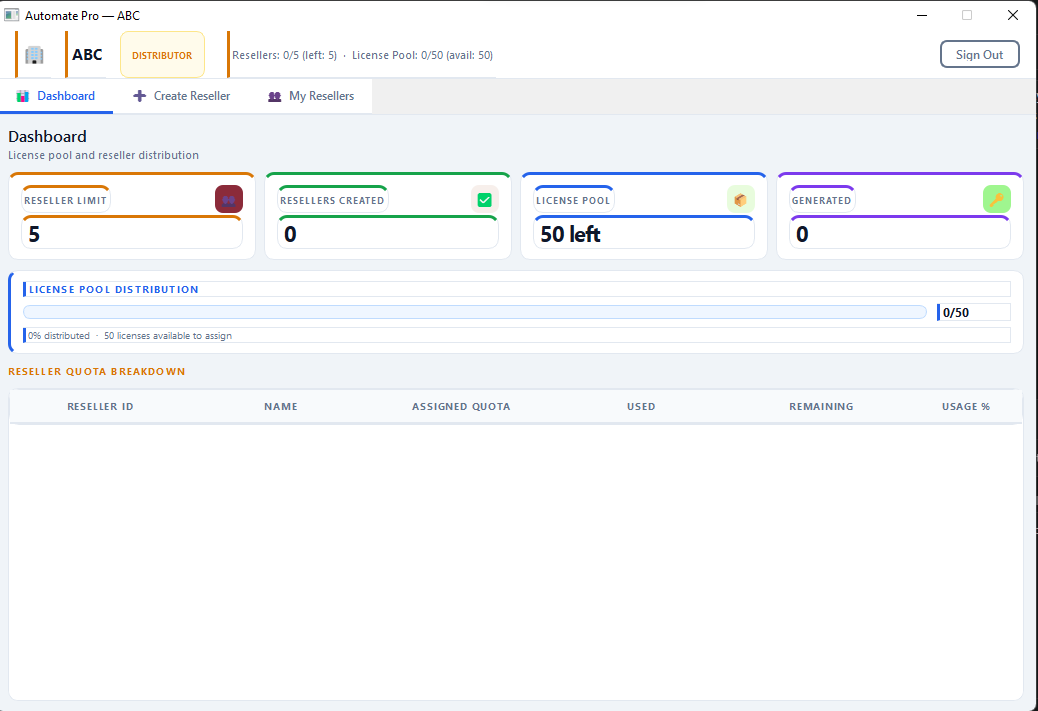
Business Partner dashboard showing license pool and partner quota breakdown
partner_dashboard.png — Business Partner dashboard

Signing in as a Business Partner opens straight onto a dashboard of your own license pool and partner network.

  • Live counts of your Channel Partner slots used vs. your limit, and licenses generated so far
  • A License Pool Distribution bar showing how much of your bulk order is still unassigned
  • A quota breakdown table listing each Channel Partner you've created, with quota assigned, used, remaining and usage %
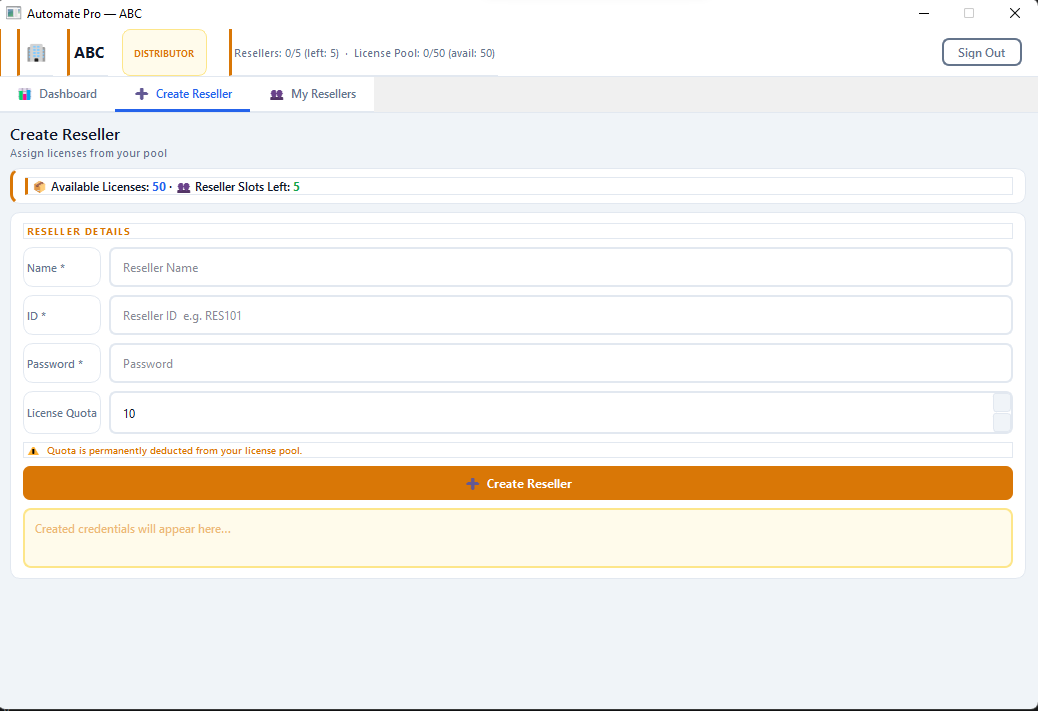
Business Partner creating a new Channel Partner and assigning a license quota
partner_create_reseller.png — Creating a Channel Partner

A Business Partner creates each Channel Partner account directly, handing them a slice of their own license pool.

  • Set the new Channel Partner's Name, ID and Password
  • Assign a License Quota — permanently deducted from the Business Partner's own pool once created
  • Login credentials for the new Channel Partner appear immediately, ready to hand off
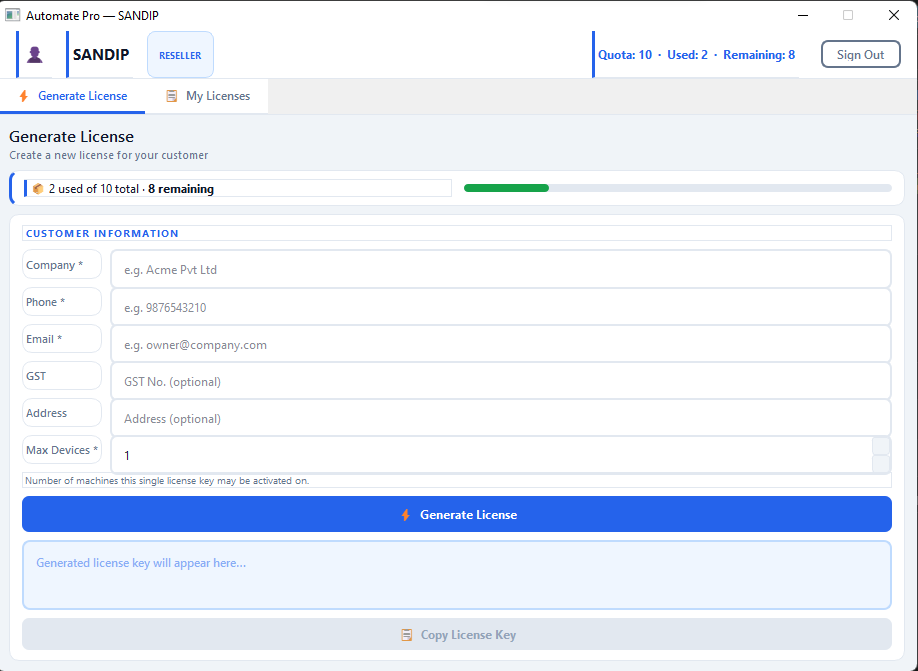
Channel Partner generating a license key for an end customer
partner_generate_license.png — a Channel Partner generating a customer license

A Channel Partner signs in to their own portal and issues license keys straight to their customers.

  • A Quota / Used / Remaining tracker at the top, so a Channel Partner always knows how many licenses they have left to sell
  • A Customer Information form: Company, Phone, Email, GST (optional), Address (optional), and Max Devices — how many machines this one key can activate on
  • Generate License produces a key instantly, with a one-click Copy License Key button to hand off to the customer
Business Partners get both views — their own dashboard for managing the Channel Partners they create, and a Generate License screen for selling directly to customers themselves.
Questions

Partner FAQ

Can a Business Partner also sell directly to customers?
Yes. A Business Partner can sell directly to end customers and also create and onboard their own Channel Partners — the two aren't exclusive.
Do Channel Partners I onboard buy from me or from Automate directly?
This is arranged directly with us when you set up your Business Partner account — call or WhatsApp us and we'll walk through how onboarding your own Channel Partners works.
Is the minimum order a one-time purchase or an ongoing requirement?
The minimum (10 licenses for Channel Partners, 50 for Business Partners) applies to your first order to activate the partnership. Reach out to discuss ongoing/repeat order terms.
What do the employee subsidy, installation bonus and marketing perks cover?
These are part of each tier's partnership package — call or WhatsApp us and we'll walk through exactly how the employee subsidy, installation bonus, marketing support/expense and happy customer incentive work for your tier.
How do I pay, since there's no online checkout?
Call or WhatsApp us to confirm your order — we'll arrange payment and license delivery with you directly, no payment gateway involved.

Ready to become a partner?

Call or WhatsApp us with your preferred tier and order size — we'll take it from there.

Message